


1) Issue: WinCalendar menu does not appear in Excel.
There are a few possible remedies. Try each of the following till resolved:
1a) Try re-installing WinCalendar using this method to assure proper permissions to install.
1b) For WinCalendar version 4.40 and newer:
Make sure the file WinCalendarV4.xlam (found in the WinCalendar install folder) is copied to the Excel Startup folder.
The default WinCalendar install folder is: C:\Program Files (x86)\WinCalendar V4\
The Excel Startup folder varies with version and Setup. Typical Excel Startup folders are:
C:\Program Files (x86)\Microsoft Office\Office x\XLSTART\
C:\Program Files (x86)\Microsoft Office\root\Office x\XLSTART\
...where x is your office version number.
For WinCalendar version 4.39 and older: Make sure that the following item is listed in checked in the Excel Add-Ins dialog. To display it, with any Workbook active, use keystroke Alt,T, I
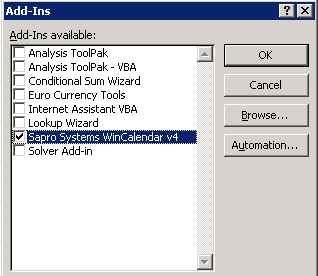
... if not select 'Browse...' & select the file WinCalendarV4.xla found in the WinCalendar installation path (by Default C:\Program Files\Sapro Systems WinCalendar\ or C:\Program Files (x86)\Sapro Systems WinCalendar\). Note: the file extension (WinCalendarV4.xla) may be hidden depending on your Windows settings. For this case select instead WinCalendarV4 file.
1c) Make sure that your Macro Security settings are set to allow programs to run. For more info see help settings: Excel 2007, Word 2007, Excel 2010 & newer, Word 2010 and newer.
1d) Make sure that WinCalendar Options have the following option set (you can get to this from WinCalendar in Windows, which you can run from the Windows 'Start' -> 'All Programs' menu) :
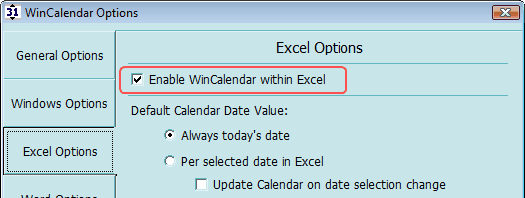
1e) If running Excel 2010 (version 14) and newer, verify that you are on 32 bit Microsoft Office. WinCalendar is not compatible with 64 bit Office. 32 bit Office running on 64 bit Windows is fine (and most common/default install).
- Click here for more info if on Office 2010 (v14) or Office 2013 (v15)
- Click here for more info if on Office 2013/365 (v15)
1f) If on Excel 2007 (version 12) and newer, verify that WinCalendar is not disabled via Excel settings.
2) Issue: WinCalendar menu does not display in Microsoft Word.
2a) Verify that Word Security settings allow WinCalendar to run.
2b) Verify that the WinCalendar template is in the Word Startup folder. This may fail to be done by the WinCalendar setup on some PC's with custom settings.
- If on Word 2007 and newer: locate file WinCalendar.dotm in the WinCalendar install folder. Copy this file to the Word Startup folder (varies with Windows/Word version)...
- If on Word version older than 2007: locate file WinCalendar.dot in the WinCalendar install folder. Copy this file to the Word Startup folder (varies with Windows/Word version).
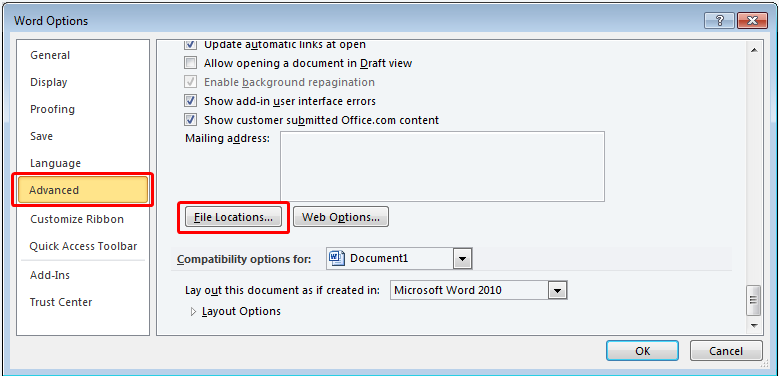
- You can determine the Word startup folder from Word Options (varies with Word version). As a reference, for Word 2010 it is given after clicking this under Options…
2c) Make sure that WinCalendar Options (click 'Customize' from the WinCalendar pop-up calendar) have the following option set:
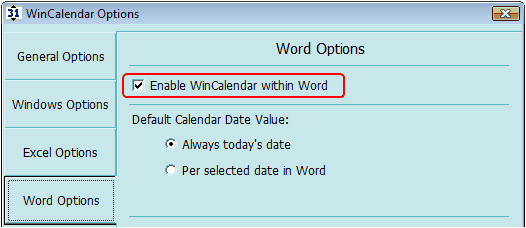
...You will need to restart Word for this setting to take effect.
2d) If on Word 2007 (version 12) and newer, verify that WinCalendar is not disabled via Word settings.
2e) If running Word 2010 (version 14) and newer, verify that you are on 32 bit Microsoft Office. WinCalendar is not compatible with 64 bit Office. 32 bit Office running on 64 bit Windows is fine (and most common/default install).
- Click here for more info if on Office 2010 (v14)
- Click here for more info if on Office 2013/365 (v15)
2f) Try re-installing WinCalendar using this method to assure proper permissions to install.
3) Issue: WinCalendar runs with errors or erratic WinCalendar behavior.
4) Issue: WinCalendar will not import my Outlook calendar or related issues
See Troubleshooting Outlook Calendar Import.
5) Issue: Google Calendar does not list a Private iCal for the Calendar that I want to import and the listed Public iCal does not work.
Some Google Apps accounts have access to the private iCal turned off by default. To enable see Allowing Private iCal Access.
6) Issue: Google Calendar, Yahoo Calendar or iCal import is missing appointments or no appointments import.
6a) Try logging into your Google Calendar account on Internet Explorer then try again. In some cases the ical http may require that you are logged into your Google account from Internet Explorer as WinCalendar uses a Internet Explorer component to access the ical feed through the internet..
6b) Verify that you are using the private and not public ical. The private ical will import all appointments (both those whos visibility is public and private). The public ical will only import public appointments - however on all calendar platforms appointments are private by default so by default no appointments will import
6c) If importing from Google Calendar and using a paid Google Apps account: be aware that the private ical is turned off by default. See here for info on enabling. Note: Changes to Google Apps account may take up to 24 hours to reflect.
6d) If importing from Google Calendar try resetting the ical. From the Google calendar settings web page select...
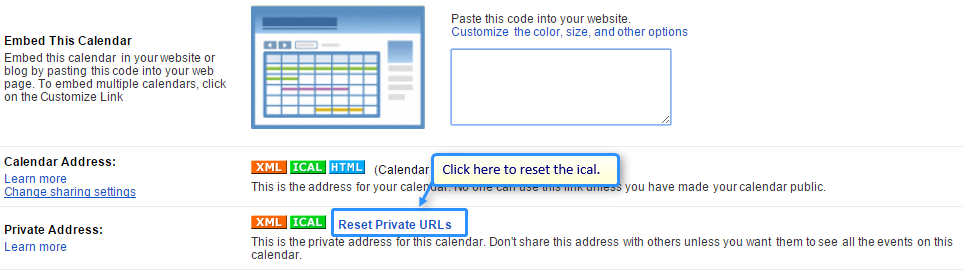
Important: the ical address will then change. You must refetch the ical and input into WinCalendar.
6e) Test the ical to see if the source is indeed passing appointment data...
- Open Windows Notepad (enter notpad.exe to the Windows start/metro screen and press enter)
- From Windows Notepad menu select File -> Open and...
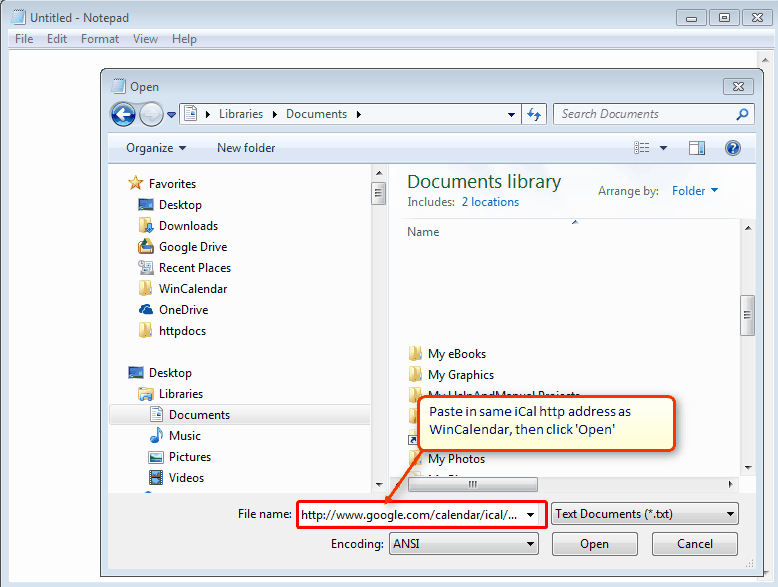
- Search for a expected appointment by using Ctrl F ...is item found ? if not then the issue is with the source ical. Please check that you are using the correct ical.
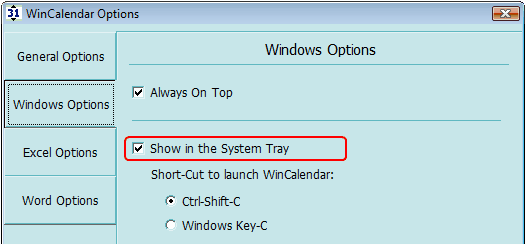
7) Issue: WinCalendar does not display in the system Tray.
Make sure the following option is checked:
8) Issue: WinCalendar did not UNinstall properly. Open Excel or Word sessions as well as your Windows account status can effect the ability of WinCalendar to UNinstall itself.
4 Things to check if WinCalendar Fails to UNinstall:
- If you are using Windows Vista be sure your Windows account is that of an 'Administrator'. If not you will need to contact your system administrator or login as an administrator & then UNinstall WinCalendar.
- Be sure to close any Word & Excel sessions prior to Uninstalling.
- Try rebooting your PC before UNinstalling if uninstall previously failed (rebooting Guarantees that there is no open Excel or Word Processes running in the background).
- Be sure that no one else is logged into the PC.
4 To UNinstall WinCalendar:
- Close any open Word, Excel & WinCalendar sessions
- Select Windows 'Start' Menu -> All Programs -> Sapro Systems WinCalendar -> UNinstall WinCalendar.
4 If the WinCalendar menu fails to remove itself from Excel, you can manually delete the WinCalendar menu by (version 2003 and older) right-clicking on any toolbar within Word or Excel & selecting 'Customize' (last menu item). Then click the WinCalendar Menu & drag it to an empty sheet area.
4 If you receive a error message upon launching Excel, something like "WinCalendar.xla could not be found. Check the spelling of the file name, and verify that the file location is correct...", then:
- Close all Excel session except one,
- From the Excel menu select 'Tools' -> 'Add-Ins...'. Then uncheck 'WinCalendar' & answer 'Yes' to any resulting dialog.
4 If WinCalendar fails to remove itself from Word:
- Close all Word sessions.
- Locate the file 'WinCalendar.dot', this file is installed to the Word Startup directory. This folder location varies depending on many variables. Try searching your PC (Windows key + F) for the file 'WinCalendar.dot' & delete all instances of this.
- Locate the file 'WinCalendar.dotm', this file is installed to the Word Startup directory. This folder location varies depending on many variables. Try searching your PC (Windows key + F) for the file 'WinCalendarMenu.dotm' & delete all instances of this.
9) Issue: Imported Google Appointment Data shows incorrect time.
| 4 | Google appointments times are translated to your local time based on your PC's time zone settings (Windows Control Panel -> Date & Time). Keep in mind that the Google Appointment times reflect the time zone set per Google Calendar Settings. If you PC's set time zone is different, then the appointment times will be based on your PC's time zone & may not match those shown in Google. |
| 4 | If you want to assure that WinCalendar will display the same appointment times as Google Calendar, then set your PC's time zone settings (Windows Control Panel -> Date & Time) to match the time zone setting in Google Calendar Settings. |
10) Issue: I need to transfer my WinCalendar license to another PC.
| 4 | To transfer a license: 1) Locate your license info received on purchase via email. 2) Uninstall from the original PC while connected to the Internet so that the license is released. 3) Install to the new PC - follow instructions per your original order email. Note: if needed, additional license support may be provided though the support period (6 Months for a Basic license and 1 Year for all other licenses). |
If you didn't find what you were looking for, please do contact us at the email addresses found here.