1) |
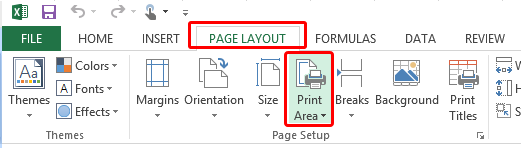
How do I set the print Range in Microsoft Excel? |
2) |
Is Microsoft Word or Excel Needed to use WinCalendar? |
3) |
What version of Excel & Word is WinCalendar compatible with? Excel version 9 through version 15. Word version 9 through version 15. |
4) |
How do I know what version of WinCalendar I have ? From WinCalendar select Help - > About WinCalendar. |
5) |
If I license WinCalendar, do I need to download the licensed version? No, there is no-re-installing required, you simply enter in a code that instantly transforms WinCalendar to the licensed version. The code is emailed to you usually within one minute of placing the order. |
6) |
How do I Uninstall WinCalendar? Just like most Windows Program, uninstall is done via the Windows control panel. |
7) |
Will my WinCalendar license get erased if I need to re-install WinCalendar or upgrade to a newer version of WinCalendar? If you have purchased a WinCalendar license & entered the license registration code, the license info will not get erase if you upgrade or re-install WinCalendar. The license will get erased on UNinstall only. |
8) |
I still have more questions, how do i contact you? |